
Documentation
Your workspace, explained.
Set up SpinWizRoulette, then explore each panel, control, and workflow.
Get started with SpinWizRoulette
WindowsNew purchases are paused while we prepare the final beta release. Existing verified memberships and complimentary access remain available.
Open your account
Open your dashboard and sign in. If you already purchased, connect the account that holds your membership and refresh access. Complimentary access is verified automatically for your signed-in account.
Install and activate
Once your access is verified, your dashboard provides the Windows 10 or 11 x64 installer and license key. Install the app and activate it online with that key. If access is missing, email info@spinwizlab.com with your order reference.
Try an idea
Review zone statistics, build a strategy, and run a simulation. Share questions and feedback on Discord.
Install Beta1
Manual releaseThis Beta1 installer includes the corrected dated-license checks, AutoBet cancellation safeguards, and analysis and history fixes. It replaces the withdrawn installer.
- Sign in and connect your Whop purchase from your dashboard. Download the installer once access is verified, then close SpinWizLab before installing.
- Check the file’s SHA-256 in PowerShell using the command below. The result should match the checksum shown here.
- Run the installer. This beta is unsigned, so Windows may show an unknown-publisher notice. Confirm that the filename and checksum match before proceeding.
- Copy your valid, unexpired key from the dashboard and activate the desktop app online. If your purchase is missing, confirm you connected the Whop account used for payment, then refresh access. Email info@spinwizlab.com with your order reference if you need help.
Beta1 · build 4.7.0-beta.3
Installer: SpinWizLab-Beta1-Setup-x64.exe
SHA-256
4cb2df0cbfded60023ce95bd711e2bb93e8bf37ce86490f703d09efc7ad6a50cIn PowerShell, from the folder containing the download:
Get-FileHash -Algorithm SHA256 ".\SpinWizLab-Beta1-Setup-x64.exe"Overview
SpinWizLab Roulette Bot is a desktop roulette analysis workspace for tracking live or manual spin history, studying table behavior, building strategy logic, and testing betting ideas before using them in a real session.
It combines a live spin sheet, zone statistics, automatic trigger detection, visual roulette bet placement, strategy building, simulation, and session tracking inside one dockable interface.
Main Panels
The app uses a dockable workspace layout. Each major feature lives in its own tab or dock panel, and users can reorganize the interface around their preferred workflow.
Top Toolbar
The top toolbar is the global command area for the app. It gives you quick access to analysis, updates, support, and your license status.
Runs a full refresh of the current spin history and updates statistics, triggers, zone displays, charts, and strategy-related analysis.
Beta1 uses manual installation and updates. Visit the website for release notes and a later installer; the app does not download or install updates automatically.
Provides quick access to the bug reporting flow so you can notify the team of any issues.
Shows whether the app is activated, the active account email, and the required license expiration date.
Website, Discord & YouTube
Quick links in the toolbar give direct access to the product website, the Discord community server, and the SpinWizLab YouTube channel.
Logout
Clears the active license session and returns the app to the activation state. Your strategies and settings are saved locally and persist after re-activating.
Spins Sheet
The Spins Sheet is the foundation of the app. It controls the current spin history and the active roulette rules used by the rest of the workspace.
Scraping
The scraping area allows users to paste a casino roulette table URL and start live history scraping for supported tables. When scraping is active, detected table information is shown in the Table Info panel.
- Casino roulette URL input
- Supported Tables browser: lists known tables by provider
- Start / Stop scraping control
- Real-time table identity detection
Supported Providers
Supported live roulette providers currently include:
Offline Rules
Offline mode lets users choose default roulette rules when manually entering spins. This matters because payout modeling affects simulations and Strategy Builder results.
- Standard Single-Zero roulette
- French / La Partage style rules
- Advanced roulette variants with non-standard payout behavior
Table Info
The Table Info panel shows metadata and payout information for the currently active table.
- Current table name and provider
- Active rules identifier
- Straight-up and bet-class payout summary
- Full payout table toggle (persisted)
- Unsupported table warning when needed
Spin History
The Spin History area is used for manual or scraped roulette numbers. The selected Spin Window controls the active history sample used across Zone Stats, Triggers, Bias Ranking, and other tools.
- Global Spin Window buttons: 2000, 1000, 500, 250 spins
- Manual comma-separated number input
- Fill Table From Input button
- Randomize Matrix for offline testing
- Add New Number (one at a time)
- Input validation for 0-36
- Read-only history cells to prevent accidental edits
Zone Stats
Zone Stats is the main statistical dashboard for roulette zones. It helps you see which areas of the table are missing, hitting, repeating, or showing unusual behavior across every bet type.
Display Controls
Zone Stats includes quick visibility buttons so you can show only the sections relevant to your current analysis. All visibility states are saved between sessions.
Top Missed Numbers
Shows the numbers that have gone longest without appearing in the current spin window. Use this to spot potential drought zones at a glance.
Frequency of Occurrence
Shows hot and cold numbers based on how often each number appears in the current spin history window. Visual chips highlight extremes.
Inside Zones
Tracks inside bet groupings: Straights, Splits, Streets, Corners, and Double Streets. Each row shows number chips with current streak, longest streak, and average.
Neighbors
Tracks wheel-neighbor zones (N1, N2, N3, and wider groupings). Useful for wheel-section players who think in physical wheel order.
Sectors
Tracks classic wheel sectors and outside-style groups. Supports both Miss and Hit modes with recent history chips displayed inline.
Hover Highlighting
Hovering over number chips or zone rows highlights the matching numbers on connected views such as the wheel and roulette table. This makes it easier to understand what a zone means visually.
Triggers
Auto-DetectThe Triggers tab is built for alerts. It has two main parts: custom trigger tickets you configure yourself, and Auto-Detect which scans the entire history automatically.
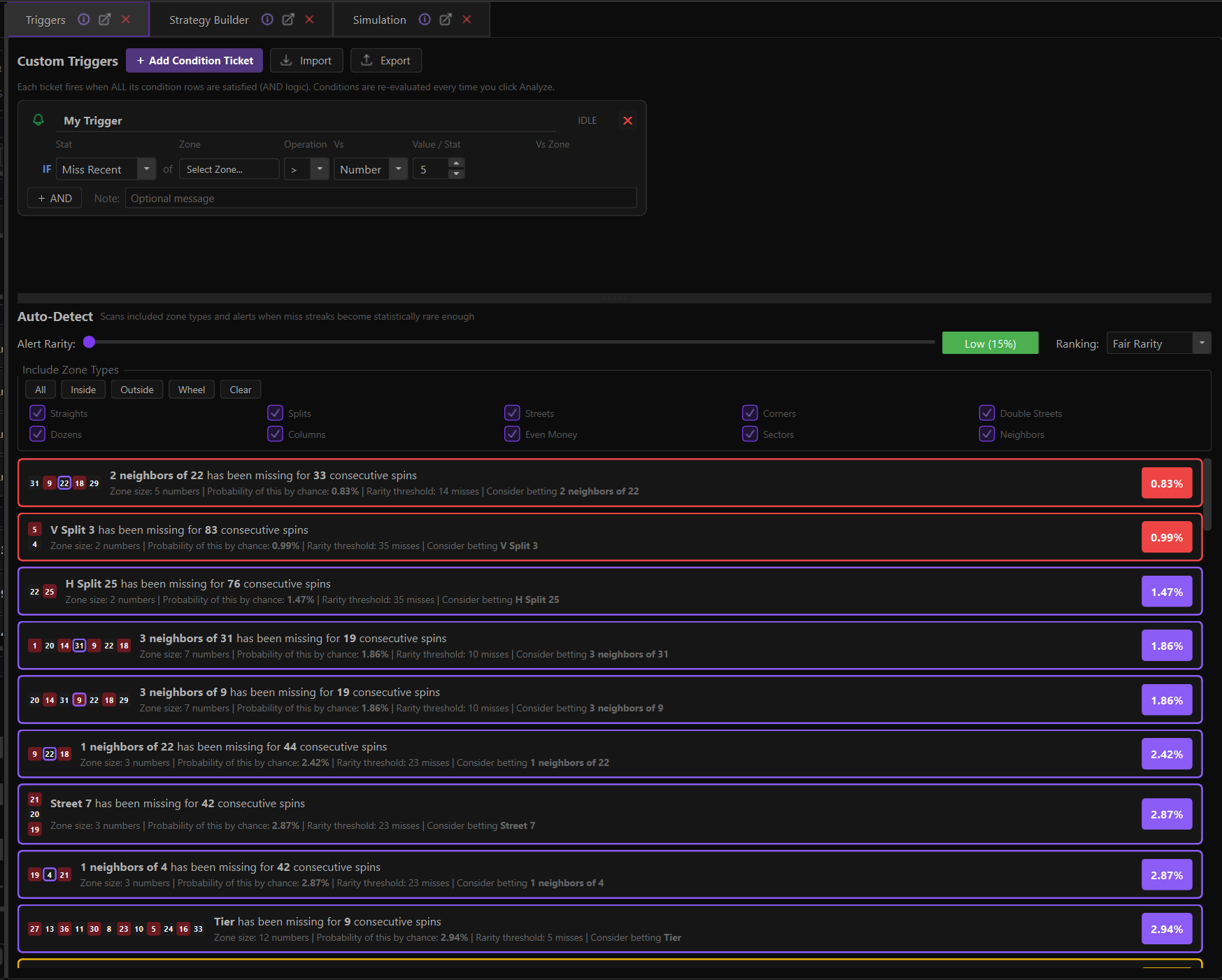
Custom Triggers
Create condition tickets that activate when all configured condition rows are true. Triggers provide sound and visual feedback when the conditions are met.
- Add Condition Ticket
- Import / Export trigger sets
- Multiple AND-style condition rows per ticket
- Visual zone picker: click table, racetrack, or top-zone
- Dynamic top-zone selections
- Trigger status badges
- Sound and visual feedback when active
Trigger Conditions
Conditions can be based on zone statistics, bet states, or bankroll behavior.
Visual Zone Picker
Instead of dropdown lists, the zone picker lets you click directly on a roulette table, racetrack, or dynamic top-zone option to select your target zone.
- Single numbers, Splits, Streets, Corners, Double Streets
- Dozens, Columns, Even-money bets
- French wheel sectors and Neighbor zones
- Top dynamic zones (e.g. coldest dozen)
Auto-Detect
Auto-Detect scans the current history and lists zones whose miss streaks are statistically rare enough to deserve attention. It answers: "Which zones are currently in an unusually long drought?"
Alert Rarity Slider
Controls how rare a miss streak must be before it appears in the list.
Ranking Modes
Fair Rarity
Ranks zones by fair-wheel probability. Asks: "How unlikely is this miss streak on a fair European wheel?" This provides a clean mathematical baseline.
Bias Weighted
Adjusts priority based on actual table behavior in the current spin window. Shows fair chance, bias score, table ratio, actual hits vs expected hits.
Include Zone Types
Filter Auto-Detect results by zone family. State is saved between sessions.
Strategy Builder
AdvancedStrategy Builder is the most advanced part of SpinWizLab. It lets you create, test, organize, run, and track betting strategies visually, without coding.
Header Controls
Strategy Tickets
Each strategy is represented as a ticket card. Tickets can be expanded for editing or collapsed to show a compact summary.
- Strategy name and running state indicator
- Start / Stop / Backtest / Reset / Delete controls
- Notes section for intent and session ideas
- Global limits (Profit Target, Stop Loss, Max Spins)
- Chain behavior to auto-start another strategy
- Bet selection configuration
- Next bet preview
- Live runtime output
- Session stats summary
Strategy Chaining
Strategies can automatically start another strategy after stopping. This enables multi-phase sessions where bankroll can be passed between strategies.
Bet Selection
Strategies support fixed bets placed on a visual table, dynamic bets chosen by live stats, or a mix of both.
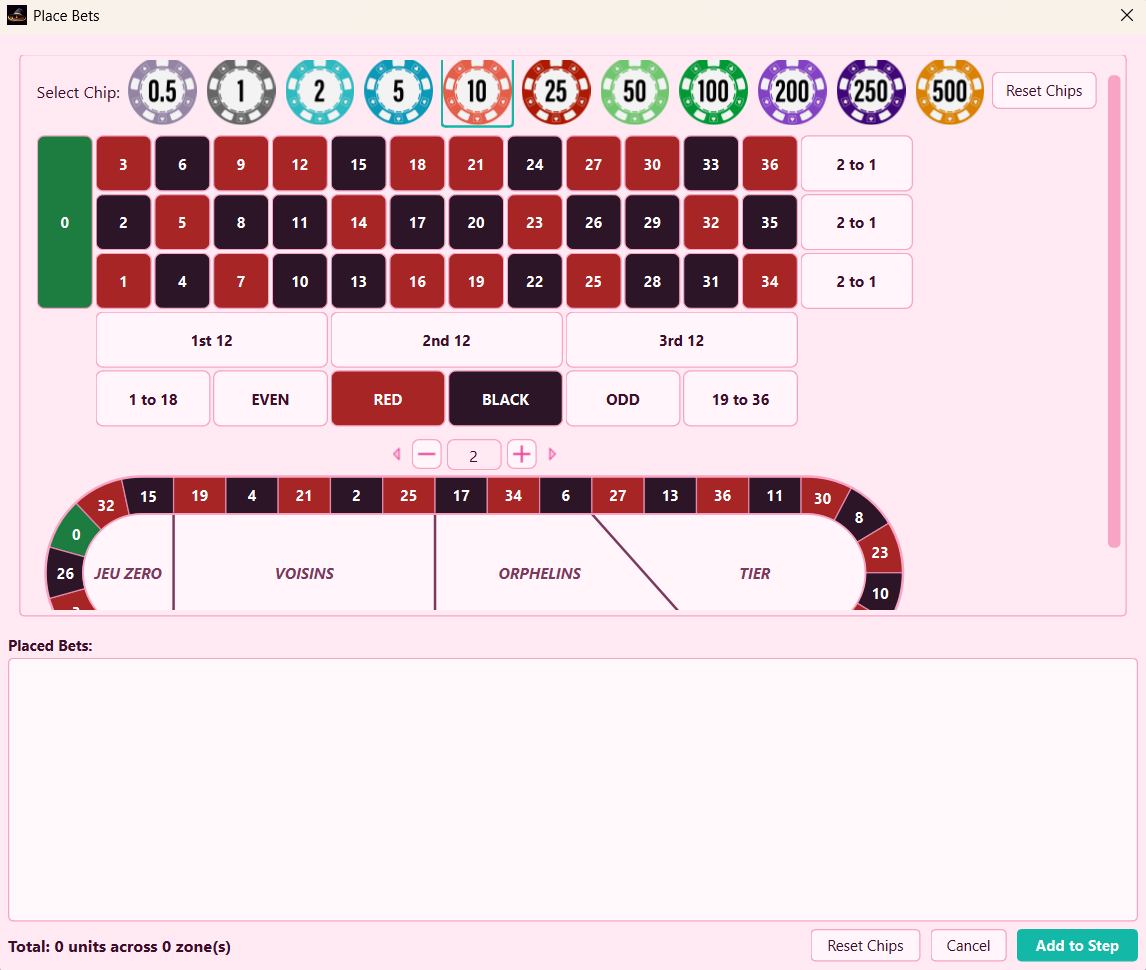
Place Bets Dialog
Visually place chips on the roulette table and racetrack to define fixed bets.
- Individual numbers
- Inside bet intersections
- Dozens and Columns
- Even-money areas
- Racetrack sectors and neighbor groups
Dynamic Bets
Let the strategy choose zones automatically based on live statistics.
- Coldest zones in category
- Hottest zones in category
- Last winner
- Rotating zones
- Top dynamic categories
Step Cards & Conditions
A strategy can have multiple steps. Each step can have fixed/dynamic bets, entry gates, conditions, and progression settings. Steps support drag-and-drop reordering.
Condition cards control what happens after wins, losses, streaks, or bankroll changes. They also support drag-and-drop reordering.
Progression Systems
The engine supports multiple stake progression styles, configurable per step or globally.
Live Runtime Output
While a strategy is running, the ticket shows live state so you can monitor every spin.
Backtesting & Charts
Run a strategy against the current spin history to see how it would have performed. Useful for verifying logic, spotting step transition mistakes, and comparing risk between templates.
- Bankroll curve chart with green/red profit zones
- Baseline and confidence-style bands
- Hover tooltips with spin-by-spin detail
- Peak and drawdown context
Templates
The app ships with ready-made strategy templates organized by risk profile. Each template includes notes, bankroll suggestions, step logic, limits, and conditions.
Conservative
Balanced
Aggressive
Strategy Wizard
The Strategy Wizard helps you generate a strategy from a simplified guided flow. Choose your risk profile, stake style, and stop logic. The wizard builds the structure.
Session History
The Strategy History dialog stores past strategy sessions for review.
Simulation
The Simulation tab is used for quick offline testing and manual roulette-table interaction. Place chips visually and test results against random or historical spins.
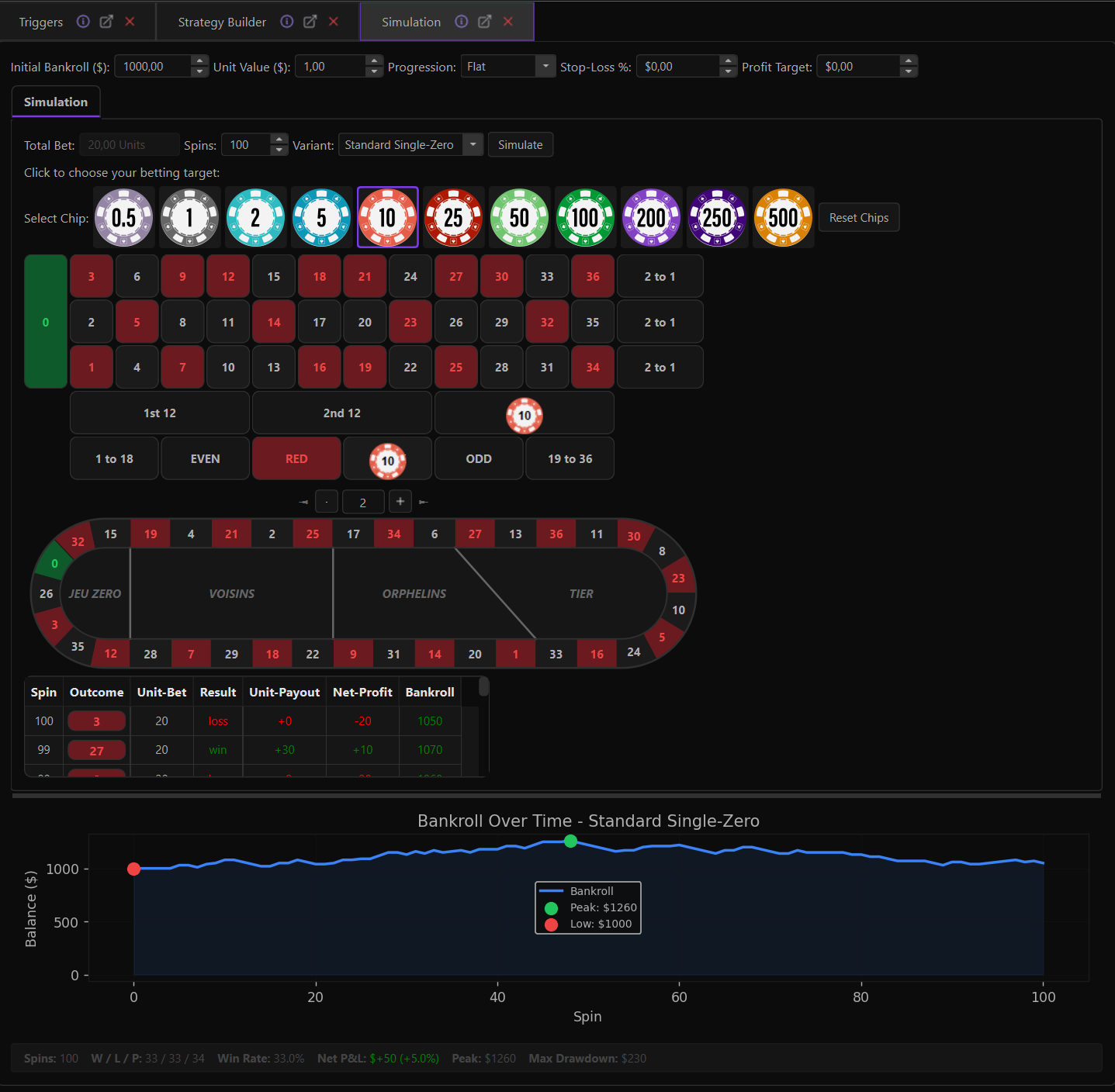
Simulation Controls
- Initial bankroll
- Unit value
- Stop loss and profit target
- Number of spins
- Roulette rules selection
- Simulate / Reset controls
Visual Betting Table
Place chips directly on the visual roulette table including all inside and outside bet areas.
Racetrack Widget
Click numbers on the racetrack to place chips on that number plus its wheel neighbors. Also supports Voisins, Tier, Orphelins, and Jeu Zero sector bets.
Simulation Output
- Spin-by-spin results
- Bankroll progress chart
- Win / Loss / Push counts
- Profit and ROI
- Peak bankroll
- Maximum drawdown
Wheel Bias
Wheel Bias helps you inspect whether certain numbers or wheel sectors are appearing unusually often or unusually rarely in the current history sample.
- Number-level hot/cold analysis
- Sector-level bias view across wheel groupings
- Bias summary cards showing expected vs actual hits
- Visual wheel canvas with color-coded frequency
- Help panel explaining how to interpret bias metrics
Statistics & Charts
SpinWizLab includes three dedicated chart and statistics views for analyzing roulette distribution at a glance.
Detailed Stats
A spreadsheet-style breakdown of roulette data. Useful for users who prefer raw tabular numbers over visual cards.
Pie Charts
Visualize distribution across common roulette categories.
Bar Charts
Hit frequency by number or category, making it easy to spot hot/cold distribution visually across all 37 roulette numbers.
Roulette Rules Engine
SpinWizLab includes a rules-aware payout engine. Payouts are mapped by bet class rather than using one generic payout for every zone. This makes strategy backtests more realistic when the active table uses non-standard payouts.
Supported Variants
Standard Single-Zero
Classic European roulette payouts
French La Partage
Even-money bets return half on zero
Lightning Roulette
Straight-up multiplier payouts
Mega Roulette
Boosted straight-up payouts on selected numbers
Red Door Roulette
Advanced variant payout rules
Mega Fire Blaze
Bonus payouts across inside bet classes
Bet Classes
The payout engine handles each bet class individually:
Themes & Layout
The app supports multiple visual themes and a semantic theme-token system. The dock layout can be rearranged, floated, and restored to suit your workflow.
- Multiple visual themes with semantic token system
- Dock panels can be floated, resized, and rearranged
- Layout restored automatically between sessions
- Theme-aware: toolbar, tickets, triggers, Zone Stats, charts, tables
- Compact mode per panel for dense layouts
Persistence
SpinWizLab saves important user state so sessions feel continuous.
Import & Export
Strategies and triggers can be exported to JSON files and imported later. This makes it easy to back up your work, share setups, and keep different strategy packs.
- Export strategies to JSON: back up your full strategy collection
- Import strategies: restore or receive strategy packs from others
- Export triggers: share your custom trigger configurations
- Import triggers: apply someone else's trigger set instantly
- Move setups between machines
- Keep separate conservative, balanced, and aggressive workspaces
FAQ
How do I contact support?
Is the beta still free?
What does the subscription include?
How do billing and cancellation work?
How do I activate the app after subscribing?
I already purchased on Whop. Do I need to pay again?
Does SpinWizLab predict the next number?
Can it scrape live roulette tables?
Can I use it offline?
What is Bias Weighted ranking?
Can I build my own strategy?
Can I share strategies?
Does it support advanced roulette variants?
Is this a guaranteed winning system?
Final beta in preparation
Coming soon
New purchases are paused while we prepare the final beta release.